
Replace a Mercedes W220 Key Fob Battery Without Misdiagnosing a No-Start
Replace the two CR2025 batteries in a W220 SmartKey, check polarity and operation, and know when the fault is probably beyond the batteries.
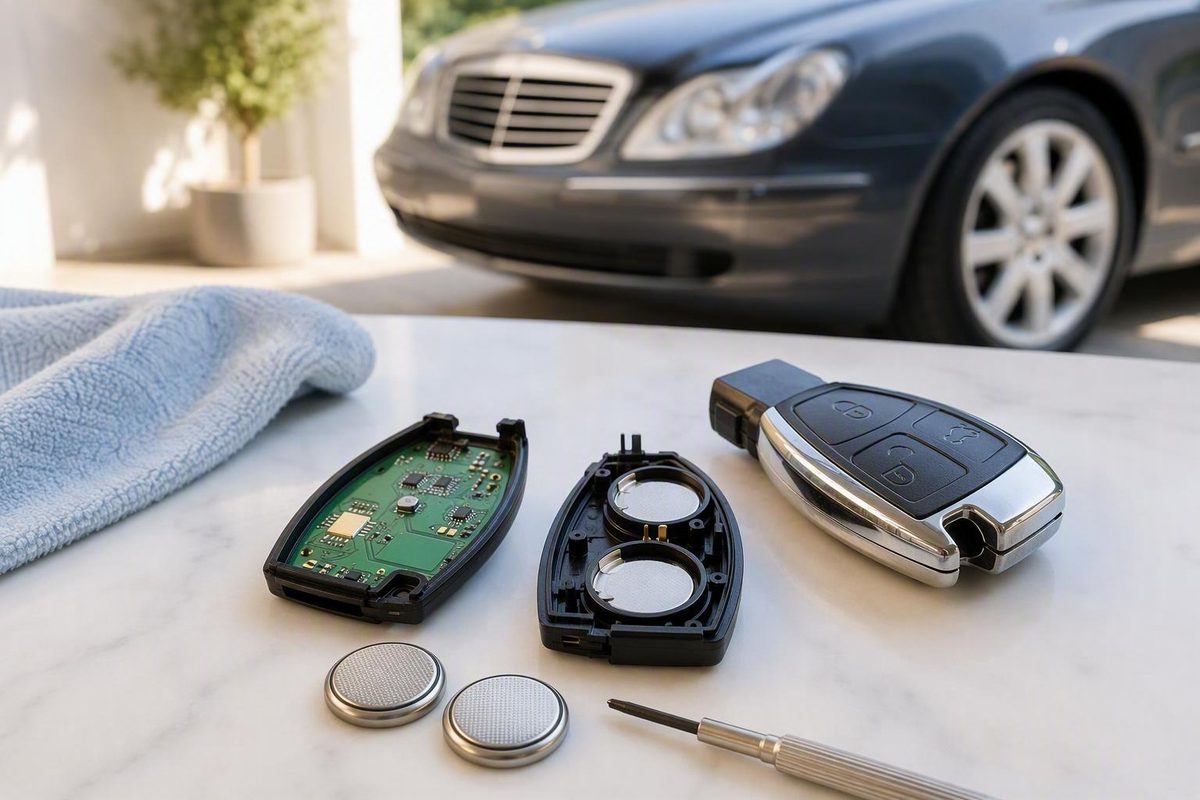
For the original black SmartKey used with many Mercedes-Benz W220 S-Class cars, buy two CR2025 lithium coin cells. Do not order from the vehicle’s year alone if the key has been replaced: identify the fob in your hand and confirm the number and type stamped on its old batteries. Mercedes dealer guidance identifies the older SmartKey as a two-CR2025 design, while later Chrome Key versions differ (Mercedes-Benz of Canton).
Check whether the batteries are actually suspect
Press a remote button and watch the small indicator lamp on the key. The 2002 S-Class operator’s manual says the lamp should light briefly when a transmit button is pressed. It also says that failed remote operation can call for either new batteries or remote synchronization—not automatically a replacement key (2002 S 430 operator’s manual).
A battery replacement is a sensible first step when:
- the indicator lamp no longer flashes;
- lock/unlock range has fallen sharply;
- the buttons work intermittently; or
- the second key works normally with the same car.
Do not treat a no-start by itself as proof of dead fob batteries. The W220 manual distinguishes the electronic key’s remote-control functions from the mechanical emergency key, and directs the owner toward system diagnosis when the engine cannot be started while the vehicle battery is in order (2002 S 430 operator’s manual). If a fresh battery restores the buttons but the key still will not turn or start the car, stop replacing coin cells and investigate the key/EIS authorization system and vehicle voltage instead.
Replace the batteries
- Work over a clean table. Keep both new CR2025 cells, the key and its battery carrier together.
- Release and withdraw the metal mechanical key. Operate the black latch at the end of the fob while pulling the blade out.
- Release the battery carrier. Insert the mechanical key sideways into the exposed opening until it depresses the internal catch, then pull the battery tray out. This is the published older-SmartKey method (Mercedes-Benz of Canton). Do not force the outer case apart.
- Record polarity before removal. Photograph the tray or note which way each marked positive face points. Remove both old cells.
- Install two matching new CR2025 cells in the same orientation. Avoid bending the contacts. If the tray will not slide in freely, stop and recheck battery seating and carrier alignment.
- Slide the carrier fully home and refit the mechanical key.
- Test beside the car. Check lock, unlock and trunk release, then confirm that the key’s indicator lamp flashes when a button is pressed.
If the W220 still does not respond
Reopen the tray and verify that both cells are CR2025, fully seated and correctly oriented. Wipe handling residue from their faces with a clean, dry cloth and inspect the battery contacts for corrosion or flattening.
Then compare the spare key:
- Spare key works: suspect the serviced key, its contacts, buttons or internal electronics.
- Neither key operates remotely: check the vehicle battery and central-locking system before condemning both keys.
- Buttons fail but the key starts the car: keep the diagnosis focused on remote operation, battery contact or synchronization.
- Key will not turn or authorize starting: this is no longer a simple coin-cell replacement; arrange W220-capable diagnosis of the key, Electronic Ignition Switch and vehicle power supply.
The older S-Class manual specifically notes that remote functions may need synchronization after a problem (2002 S 430 operator’s manual). Follow the synchronization procedure in the operator’s manual for your exact model year rather than a generic Mercedes sequence, because W220 key equipment changed over the production run.